A smarter way to fill shifts: Introducing our new smart-matching model
We’ve rebuilt how professionals are matched to your shifts, making the process faster, simpler, and more reliable, with no extra work required from you.
Instead of sorting through applications, Qwick now automatically selects the best available professional for your shift using real performance data—including skills, experience, reliability, shift history, and your business preferences—and sends them the shift offer to confirm.
No more reviewing applicants.
No more guesswork.
Just stronger matches, automatically.
This upgrade is powered by Mara, Qwick’s AI matching engine. Mara is trained on over 2.5M+ real hospitality shifts and continuously learns from shift outcomes, ratings, attendance patterns, and preferences, helping ensure each shift is filled by the right professional the first time.
What’s changing
Where did my “Applicants” go?
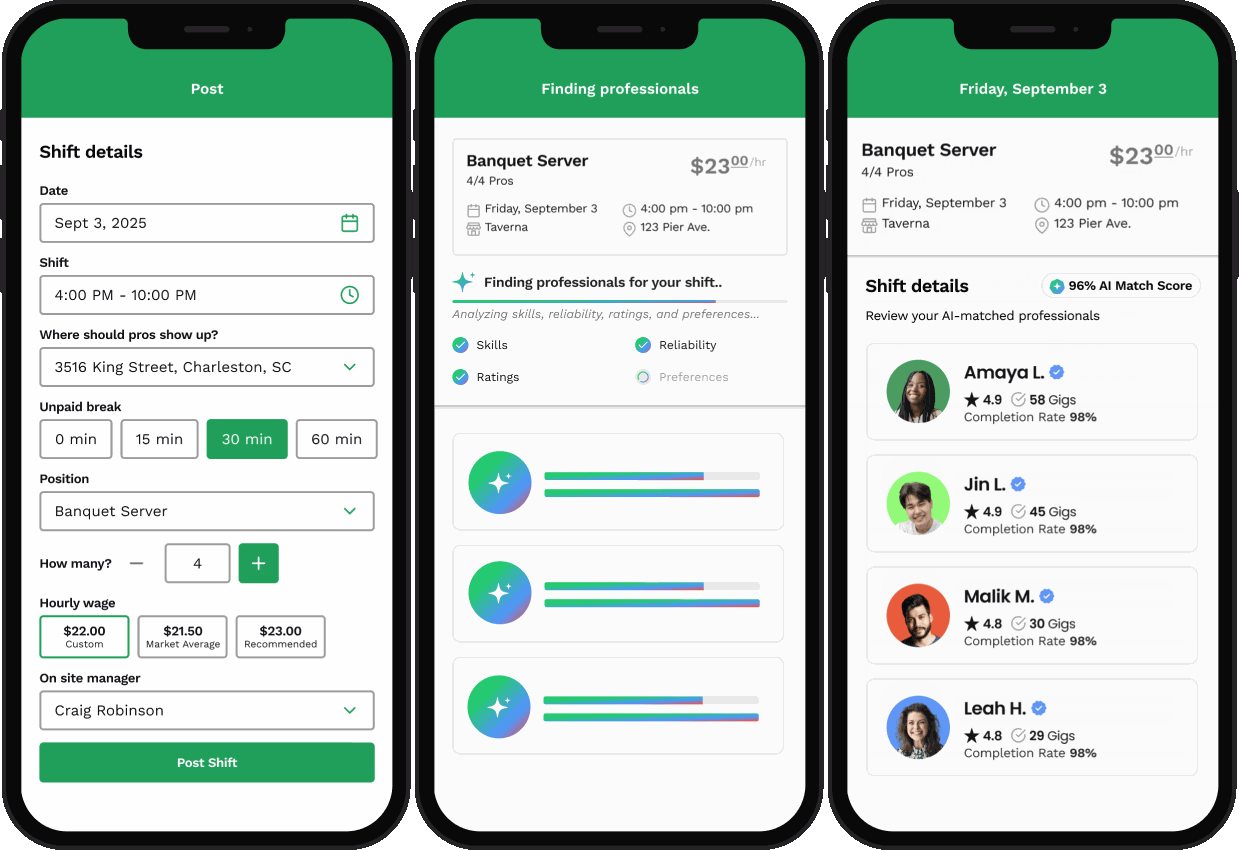
The “Applicant” view has been replaced with a new shift-fulfillment view.
Instead of requiring you to manually review and select professionals from a list of applicants, our proprietary matching algorithm now automatically pairs each shift with the most qualified professionals based on your specific needs and preferences.
You will now see:
A progress screen while your shift is being filled
A confirmed roster once professionals are matched
Once a professional is confirmed for your shift, they’ll appear on your shift details page, with full visibility into their name, rating, and profile.
Why did Qwick make this change?
Our data shows that automated matching is not only faster, but leads to higher-quality outcomes for our business partners.
Manual applicant review often delays fulfillment. In contrast, our algorithm instantly analyzes dozens of real-world signals—from professional skillsets and experience to your business’s preferences and requirements—to identify the best-fit talent.
Because our proprietary matching algorithm is trained on over 2.5M hospitality shifts, it can quickly determine who is most likely to:
Show up reliably
Perform the skills needed for the shift at a high level
Be a strong fit for your specific shift
The result is a 98%+ fill rate and a more reliable experience, all while freeing up your time to focus on other business operations instead of wading through applications.
Reliability + quality control
How does the algorithm choose the right professional?
Our proprietary, Mara AI-fueled matching algorithm uses a nonlinear scoring model that evaluates more than 20 variables, including:
Pro ratings for your shift’s specific skill needs
Completion rates and reliability metrics
Platform experience
Your past shift ratings
Your Favorites and Groups
Business-specific preferences and requirements
It prioritizes professionals with strong performance histories who align with your expectations.
In short, it’s looking for the same things you would—just much faster and at scale.
What if I don’t like the professional who was matched?
You still maintain control.
If a professional isn’t the right fit, you can dismiss them. The system will ask if you’d like a replacement, and the matching algorithm will immediately begin searching for another qualified professional.
Does this change my Favorites or Groups?
No — it actually makes them more powerful.
When you post a shift, we automatically send shift offers to professionals included in your Favorites and Groups first.
Your preferred professionals get the first opportunity to claim your shift before it opens to the broader marketplace, helping you maintain your bench of trusted talent.
Marketplace + Connect tab updates
Why can’t I search the entire marketplace in the Connect tab anymore?
We’ve simplified the Connect tab to focus on professionals you’ve already worked with.
By centering the experience around your existing relationships, you can:
More easily manage your bench of reliable talent
Quickly Favorite top performers
Strengthen relationships with professionals who already know your business
This eliminates the need to search through thousands of profiles and supports staffing consistency.
I’m a new business. Will my Connect tab be empty?
Initially, yes—it will show a zero state until you begin completing shifts.
The best way to build your roster of preferred talent is to:
Post a shift
Let our matching algorithm pair your shift with top-rated professionals
Favorite the professionals you love after each shift
Over time, your Connect tab will populate with a custom roster of trusted professionals.
Experience Required shifts
Does the system account for Experience Required shifts?
Yes.
If a shift is marked as Experience Required, the algorithm applies stricter matching criteria and will only match professionals who:
Have the exact skill badge required, or
Are within one hierarchy level of that skill
This ensures you receive appropriately experienced talent for critical roles.
Payments + account settings
Will this change my billing, payments, or account settings?
No. Your payment methods, invoicing, ratings, and historical data all remain the same.
Shifts are paid exactly as you’re accustomed to. The only change is how professionals are matched to your shifts.
What this means for you
✔ Less time spent reviewing and selecting applicants
✔ High-confidence matches powered by real performance data
✔ More consistent coverage and fewer last-minute surprises
✔ Stronger alignment with your business preferences
Built to create better experiences on both sides of the marketplace, our new smart-matching model reflects feedback from both business partners and professionals and is designed to make filling shifts easier than ever.
If you have questions, our team is here to help. Contact support anytime by texting 79425 or emailing support@qwick.com.
Note: Our enhanced matching system is currently rolling out across the country. While it may not be live in your specific market just yet, we’re working hard to bring these improvements to everyone. Keep an eye on your app—you’ll be seeing these updates very soon!