Getting your next shift: How Qwick matching works
At Qwick, our goal is to help you secure work quickly and reliably. To make securing shifts easier, we’ve updated the platform with a new matching model. This model provides you with direct access to nearby shifts that align with your skills, eliminating the stress of "shift-hunting" or waiting for applications.
How do I get confirmed for a shift?
Gone are the days of manually applying and waiting for a business to review your profile. Now, the app will only show you shifts that are actively available to you, and you can accept them instantly.
Automatically receive shift invites: When a shift matches your skills and location, you will receive a notification that a shift is available for you to accept. We call this a “match”! You can view all of your shift matches and direct offers in the Matches tab of your app.
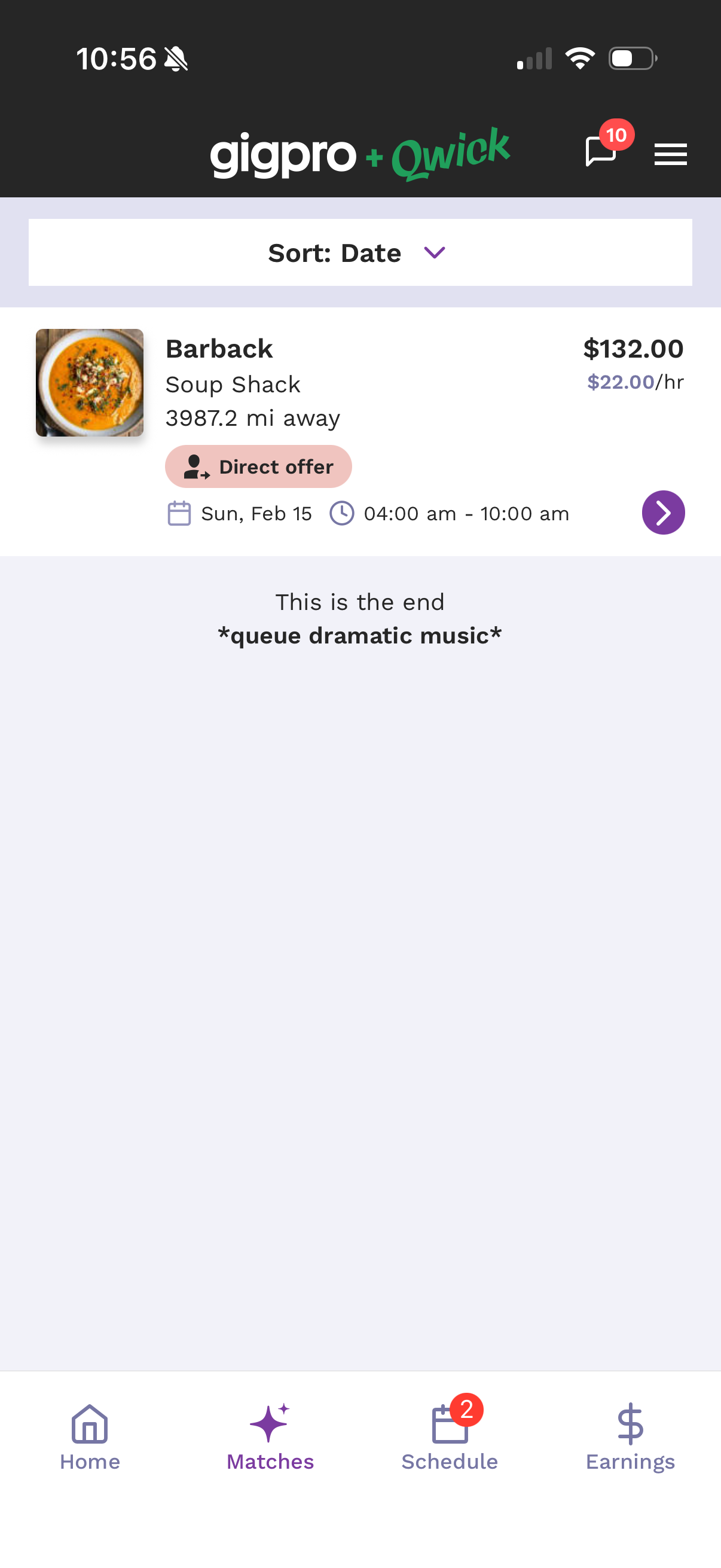
Confirm or decline shifts: Tap a shift invite to review the details, then confirm or decline. There's no application or waiting for approval — we've already verified you're a fit, so hitting Confirm books you on the spot. If you can't or don't want to work it, declining has no negative impact on your account. Just be sure before you confirm, since the shift is yours once you do.
How does the algorithm choose me for shifts?
The system looks at over 20 different factors to find the best match for each shift. The most important things you can control are:
Reliability: Your shift completion percentage found on your profile. (Keep yours high by only accepting shifts you are sure you can work, and avoiding callouts/no-call no-shows as best as you can.)
Quality: Your average rating and specific rating for the skill required for the shift. (It really pays to bring your A-game to each shift. Literally!)
Experience: The number of paid shifts you’ve completed in the skill required for the shift.
Proximity: How close you are to the shift location.
I’m a new pro—how do I get started?
If you don't have experience on the platform yet, don't worry! For shifts where "experience required" is not selected, the algorithm is designed to give new pros a chance to get out there and build their rating. Once you complete your first few shifts with high ratings, the algorithm will naturally start sending you more offers.
Why can’t I see all the shifts on the board anymore?
Instead of a crowded board of shifts you may not be eligible for, we are showing you the shifts actively available to you. This reduces time spent applying or waiting to hear back from businesses regarding shifts, eliminates frustration, and ensures that when you see a shift, it’s something you can actually add to your schedule.
What is this new Home tab?
Think of the Home tab as your centralized hub for all important actions on the app. You'll find your upcoming shifts here, important news and announcements, plus links to our help center and support team.
Have additional questions regarding shift matches? Please reach out to our support team by texting 79425 or emailing support@qwick.com.
Note: Our enhanced matching system is currently rolling out across the country. While it may not be live in your specific market just yet, we’re working hard to bring these improvements to everyone. Keep an eye on your app—you’ll be seeing these updates very soon!